Sign in with Google
Write Dynamic SQL to Filter Customers by Any City
Write Dynamic SQL to Filter Customers by Any City
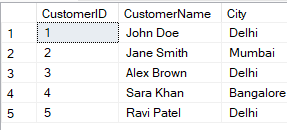
Customers Table:
Query Explanation:
DECLARE @City NVARCHAR(100);
-
This declares a variable to store the city name you want to filter by.
SET @City = 'Delhi';
-
You assign the city name you want (like
'Delhi'). -
You can change it to
'Mumbai','Indore', etc.
DECLARE @SQL NVARCHAR(MAX);
-
This declares another variable to hold your dynamic SQL query as text.
SET @SQL = ' ... ';
-
Here, you define the actual SQL query as a string.
-
This query selects customers from the
Customers3table where the city is equal to the value of@CityName.
EXEC sp_executesql ...
-
This is a special system procedure that executes dynamic SQL.
-
It allows passing parameters (in this case,
@CityName). -
This makes the query safe and flexible, because it avoids SQL injection and allows reuse.
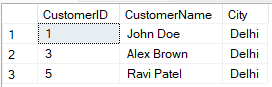
SQL Query:
DECLARE @City NVARCHAR(100);
SET @City = 'Delhi';  -- Change this to any city you want to filter by

DECLARE @SQL NVARCHAR(MAX);

SET @SQL = '
    SELECT
        CustomerID,
        CustomerName,
        City
    FROM
        Customers
    WHERE
        City = @CityName';

EXEC sp_executesql
    @SQL,
    N'@CityName NVARCHAR(100)',
    @CityName = @City;
Output: