Sign in with Google
Trigger to Update Stock After Inserting Order Details
Trigger to Update Stock After Inserting Order Details
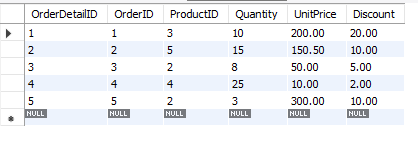
OrdersDatial1 Table:
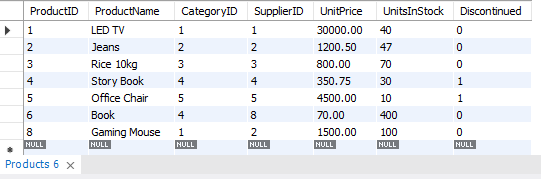
Products Table:
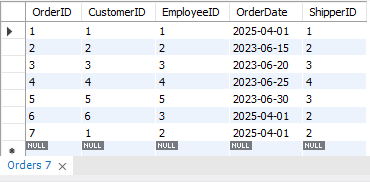
Orders Table:
Query Explanation:
-
DELIMITER //: This sets the delimiter to
//temporarily so we can define the trigger properly, as the semicolon;is used in the trigger body. -
CREATE TRIGGER update_product_stock: This starts the creation of the trigger named
update_product_stock. The trigger is created on the OrderDetails1 table. -
AFTER INSERT ON OrderDetails1: This means the trigger will fire after an insert operation is performed on the
OrderDetails1table. -
FOR EACH ROW: This specifies that the trigger will execute for each row that gets inserted into the table.
-
BEGIN ... END: This block defines the actions to be executed when the trigger is fired.
-
UPDATE Products SET UnitsInStock = UnitsInStock - NEW.Quantity WHERE ProductID = NEW.ProductID;:
-
NEW.Quantityrefers to the quantity value from the newly inserted row inOrderDetails1. -
NEW.ProductIDrefers to the product ID from the newly inserted row inOrderDetails1. -
The query updates the
UnitsInStockin theProductstable by subtracting the ordered quantity from the stock of the corresponding product.
-
-
DELIMITER ;: This restores the default delimiter (semicolon
;), which is used for standard SQL queries.
SQL Query:
DELIMITER //

-- Create a trigger to update the stock in Products table when a new order is inserted into OrderDetails1
CREATE TRIGGER update_product_stock
AFTER INSERT ON OrderDetails1
FOR EACH ROW
BEGIN
    -- Update the UnitsInStock in the Products table by subtracting the quantity ordered
    UPDATE Products
    SET UnitsInStock = UnitsInStock - NEW.Quantity
    WHERE ProductID = NEW.ProductID;
END //

DELIMITER ;


--- Insert a new order that will activate the trigger

INSERT INTO OrderDetails1 (OrderID, ProductID, Quantity, UnitPrice, Discount)
VALUES (8, 3, 5, 1000.00, 50.00);
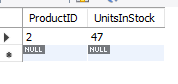
Output: