Sign in with Google
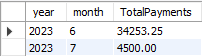
View to See Payments Per Month
View to See Payments Per Month
Payments Table:
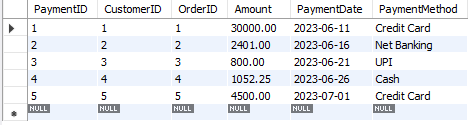
Query Explanation:
-
CREATE VIEW PaymentsPerMonth: This creates a new view called
PaymentsPerMonth. -
YEAR(PaymentDate) AS Year: This extracts the year part of the
PaymentDateto group payments by year. -
MONTH(PaymentDate) AS Month: This extracts the month part of the
PaymentDateto group payments by month. -
SUM(Amount) AS TotalPayments: This calculates the total payments for each month.
-
GROUP BY YEAR(PaymentDate), MONTH(PaymentDate): This groups the data by year and month to calculate the sum of payments per month.
SQL Query:
-- Step 1: Create a view to show payments per month
CREATE VIEW PaymentsPerMonth AS
SELECT
    YEAR(PaymentDate) AS Year,                      -- Extract the year from PaymentDate
    MONTH(PaymentDate) AS Month,                    -- Extract the month from PaymentDate
    SUM(Amount) AS TotalPayments                    -- Sum of payments for each month
FROM
    Payments                                          -- From the Payments table
GROUP BY
    YEAR(PaymentDate), MONTH(PaymentDate);           -- Group by year and month

-- Step 2: View the data from the PaymentsPerMonth view
SELECT * FROM PaymentsPerMonth;
Output: