Sign in with Google
AFTER INSERT Trigger to Log Order Information
AFTER INSERT Trigger to Log Order Information
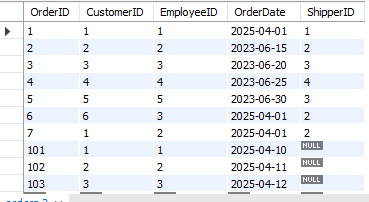
Orders Table:
OrderLogs Table:
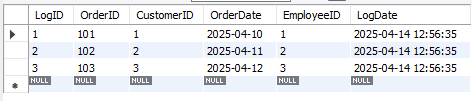
Query Explanation:
-
CREATE TABLE OrderLogs (...): Creates a new tableOrderLogsto store the details of each new order inserted. -
LogID INT AUTO_INCREMENT PRIMARY KEY: Generates a unique ID for each log entry automatically. -
LogDate TIMESTAMP DEFAULT CURRENT_TIMESTAMP: Automatically records the time when a log entry is created. -
DELIMITER //: Changes the command delimiter to//so we can write a multi-line trigger block. -
CREATE TRIGGER log_order_info AFTER INSERT ON Orders: Defines a trigger that fires after a new record is inserted into theOrderstable. -
FOR EACH ROW BEGIN ... END: Executes the code block for each row inserted. -
NEW.OrderID, NEW.CustomerID, ...: Refers to the values of the row being inserted. -
INSERT INTO OrderLogs (...) VALUES (...): Inserts the new order details intoOrderLogs. -
DELIMITER ;: Resets the delimiter back to the default semicolon. -
INSERT INTO Orders (...) VALUES (...): Inserts five sample records into theOrderstable which automatically triggers the log. -
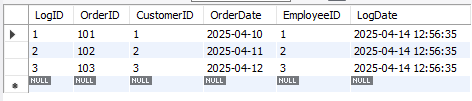
SELECT * FROM OrderLogs;: Displays all log records that were generated due to the above insertions.
SQL Query:
-- Create table to log inserted orders
CREATE TABLE OrderLogs (
    LogID INT AUTO_INCREMENT PRIMARY KEY,
    OrderID INT,
    CustomerID INT,
    OrderDate DATE,
    EmployeeID INT,
    LogDate TIMESTAMP DEFAULT CURRENT_TIMESTAMP
);

-- Change delimiter to define multi-statement trigger
DELIMITER //

-- Trigger to log order info after a new order is inserted
CREATE TRIGGER log_order_info
AFTER INSERT ON Orders
FOR EACH ROW
BEGIN
    INSERT INTO OrderLogs (OrderID, CustomerID, OrderDate, EmployeeID)
    VALUES (NEW.OrderID, NEW.CustomerID, NEW.OrderDate, NEW.EmployeeID);
END //

-- Reset delimiter back
DELIMITER ;

-- Insert sample records into Orders table
INSERT INTO Orders (OrderID, CustomerID, OrderDate, EmployeeID) VALUES
(101, 1, '2025-04-10', 1),
(102, 2, '2025-04-11', 2),
(103, 3, '2025-04-12', 3),
(104, 4, '2025-04-13', 4),
(105, 5, '2025-04-14', 2);

-- View logs of inserted orders
SELECT * FROM OrderLogs;
Output: