
 Sign in with Google
Add CHECK Constraint on Quantity > 0
Add CHECK Constraint on Quantity > 0
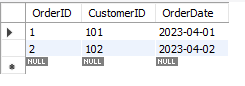
Orders2 Table:
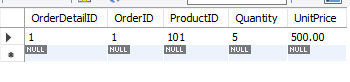
OrderDetails2 Table:
Query Explanation:
- Creating Tables:
- Orders2 stores the order's general information like OrderID, CustomerID, and OrderDate.
- OrderDetails2 stores specific details of each order, including a Quantity field with a CHECK constraint to ensure that the quantity is always greater than 0.
- Orders2 stores the order's general information like OrderID, CustomerID, and OrderDate.
- CHECK Constraint:
- The Quantity column in OrderDetails2 has a CHECK constraint: CHECK (Quantity > 0). This constraint ensures that the quantity value must be greater than 0, preventing the insertion of invalid data (e.g., zero or negative quantities).
- The Quantity column in OrderDetails2 has a CHECK constraint: CHECK (Quantity > 0). This constraint ensures that the quantity value must be greater than 0, preventing the insertion of invalid data (e.g., zero or negative quantities).
- Inserting Valid Data:
- The first insert statement adds valid data with Quantity = 5 into both the Orders2 and OrderDetails2 tables.
- This insert will succeed and the message "Data inserted successfully into OrderDetails2 with Quantity > 0" will be displayed.
- The first insert statement adds valid data with Quantity = 5 into both the Orders2 and OrderDetails2 tables.
- Inserting Invalid Data:
- The second insert attempts to insert data with Quantity = 0. This violates the CHECK constraint because the quantity cannot be zero. As a result, the insert will fail and display the following error:
- Error Code: 3819. CHECK constraint 'chk_quantity_positive' is violated.
- Error Code: 3819. CHECK constraint 'chk_quantity_positive' is violated.
- The second insert attempts to insert data with Quantity = 0. This violates the CHECK constraint because the quantity cannot be zero. As a result, the insert will fail and display the following error:
Summary:
- The CHECK constraint ensures that only valid quantities (greater than 0) are allowed in the OrderDetails2 table.
- Any attempt to insert data with an invalid quantity (0 or less) will result in an error, maintaining data integrity in the database.
SQL Query:
-- Creating Orders table
CREATE TABLE Orders2 (
    OrderID INT PRIMARY KEY,
    CustomerID INT,
    OrderDate DATE
);

-- Creating OrderDetails table with CHECK constraint on Quantity
CREATE TABLE OrderDetails2 (
    OrderDetailID INT PRIMARY KEY,
    OrderID INT,
    ProductID INT,
    Quantity INT CHECK (Quantity > 0),  -- Quantity must be greater than 0
    UnitPrice DECIMAL(10,2),
    FOREIGN KEY (OrderID) REFERENCES Orders2(OrderID)
);

-- Insert Valid Data (Quantity > 0)
INSERT INTO Orders2 (OrderID, CustomerID, OrderDate)
VALUES (1, 101, '2023-04-01');

INSERT INTO OrderDetails2 (OrderDetailID, OrderID, ProductID, Quantity, UnitPrice)
VALUES (1, 1, 101, 5, 500.00);

-- Insert Invalid Data (Quantity = 0)
INSERT INTO Orders2 (OrderID, CustomerID, OrderDate)
VALUES (2, 102, '2023-04-02');

INSERT INTO OrderDetails2 (OrderDetailID, OrderID, ProductID, Quantity, UnitPrice)
VALUES (2, 2, 102, 0, 300.00);  -- This will fail due to CHECK constraint
Output:
INSERT INTO OrderDetails2 (OrderDetailID, OrderID, ProductID, Quantity, UnitPrice) VALUES (2, 2, 102, 0, 300.00) Error Code: 3819. Check constraint 'orderdetails2_chk_1' is violated.
