
 Sign in with Google
Analyze Execution Plan for a Query with and without Index
Analyze Execution Plan for a Query with and without Index
Query Explanation:
-
Step 1: Create an index on
CustomerIDin theOrderstable to improve query performance. -
Step 2: Execute the query without an index to analyze the full table scan.
-
Step 3: Execute the query with the index to see the optimization in the execution plan.
-
Step 4: Optionally, drop the index once it's no longer needed.
Important Comments:
-
-- Without index: The database performs a full table scan which can be slow and inefficient. -
-- With index: Using the index significantly optimizes the query by directly searching for relevant rows, speeding up execution.
SQL Query:
-- Step 1: Create an index on CustomerID for optimized query performance
CREATE INDEX idx_customer_id ON Orders(CustomerID);

-- Step 2: Execute the query without an index
EXPLAIN SELECT * FROM Orders WHERE CustomerID = 1;
-- Without index: The database will perform a **full table scan** (ALL type), which can be slow.

-- Step 3: Execute the query after creating the index
EXPLAIN SELECT * FROM Orders WHERE CustomerID = 1;
-- With index: The database will use the `idx_customer_id` index, optimizing the query by directly searching for the required rows (ref type).

-- Step 4: Drop the index after usage (optional)
DROP INDEX idx_customer_id ON Orders;
Output:
With Index:
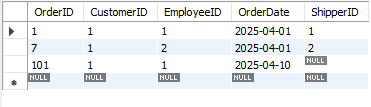
Without Index:

