Sign in with Google
Add a Trigger to Check for Negative Stock Levels
Add a Trigger to Check for Negative Stock Levels
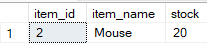
Explanation:
-
Although 2 rows were inserted, only the one with non-negative stock (
Mouse) remains in the table. -
The row with negative stock (
Keyboard) was removed automatically by the trigger.
SQL Query:
Step 1: Use the Database
USE IT;
GO

Step 2: Create the Trigger

CREATE TRIGGER check_negative_stock
ON inventory
AFTER INSERT
AS
BEGIN
    -- Remove rows with negative stock
    DELETE FROM inventory
    WHERE item_id IN (
        SELECT item_id FROM inserted WHERE stock < 0
    );

    -- Optional: print a message for user awareness
    IF EXISTS (SELECT 1 FROM inserted WHERE stock < 0)
    BEGIN
        PRINT 'Warning: Some records were not inserted due to negative stock levels.';
    END
END;


Step 3: Insert Sample Data

USE IT;
INSERT INTO inventory VALUES;

(1, 'Keyboard', -10),
(2, 'Mouse', 20);
Output:
(1 row affected)
Warning: Some records were not inserted due to negative stock levels.
(2 rows affected)