Sign in with Google
Create a View for Customer Order Summary
Create a View for Customer Order Summary
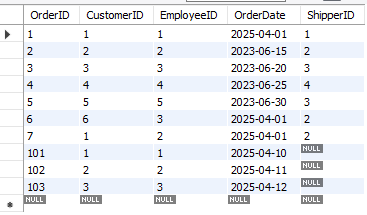
Orders Table:
Query Explanation:
-
CREATE VIEW CustomerOrderSummary AS: A new view is being created to summarize customer orders.
-
SELECT o.CustomerID: Selects the
CustomerIDfrom theOrderstable. -
COUNT(o.OrderID) AS TotalOrders: Counts the total number of orders for each customer.
-
SUM(od.Quantity * od.UnitPrice - od.Discount) AS TotalSpent: Calculates the total amount spent by each customer by multiplying quantity and unit price, and subtracting the discount from each order in the
OrderDetailstable. -
FROM Orders o JOIN OrderDetails od: Joins the
Orderstable with theOrderDetailstable to get all order-related details. -
ON o.OrderID = od.OrderID: The join condition is based on matching
OrderIDin both tables. -
GROUP BY o.CustomerID: Groups the result by
CustomerID, so each row shows data for one customer.
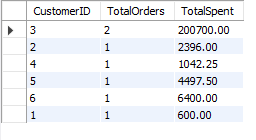
Result: The view will provide a summary of how many orders each customer placed and the total amount they spent.
SQL Query:
-- Create a view to summarize customer orders using OrderDetails table for the total value
CREATE VIEW CustomerOrderSummary AS
SELECT
    o.CustomerID,                                -- Customer ID
    COUNT(o.OrderID) AS TotalOrders,              -- Total number of orders by customer
    SUM(od.Quantity * od.UnitPrice - od.Discount) AS TotalSpent   -- Total spent calculated from OrderDetails
FROM
    Orders o                                      -- From the Orders table
JOIN
    OrderDetails od                              -- Join with OrderDetails to get details for each order
    ON o.OrderID = od.OrderID                    -- Matching OrderID in both tables
GROUP BY
    o.CustomerID;                                -- Grouping by CustomerID to get summary per customer


-- View the data from the CustomerOrderSummary view
SELECT * FROM CustomerOrderSummary;
Output: