Sign in with Google
Write a Command to Back Up the Database
A Command to Back Up the Database
Path Explanation:
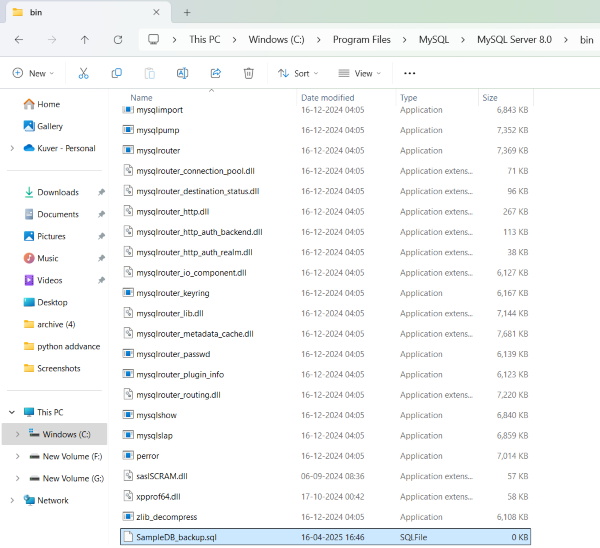
Program Files\MySQL\MySQL Server 8.0\bin
# This is the directory where MySQL is installed on your system.
# The "bin" folder contains executable files like mysqldump.exe, mysql.exe, etc.
# To run the backup command, you need to navigate to this path using the command prompt.
# Example: cd "C:\Program Files\MySQL\MySQL Server 8.0\bin"
mysqldump Command Explanation:
mysqldump -u root -p SampleDB > SampleDB_backup.sql
# This command is used to create a backup of the "SampleDB" database.
# mysqldump → The tool used to export a MySQL database.
# -u root → Specifies the username (root) to log into MySQL.
# -p → Prompts for the password after you press Enter.
# SampleDB → The name of the database you want to back up.
# > SampleDB_backup.sql → Redirects the output (SQL dump) to a file named "SampleDB_backup.sql".
# This file will contain all the SQL statements needed to recreate the database.
Description:
This command is used to create a backup of a MySQL database using the mysqldump utility.
-
mysqldump: This is a MySQL command-line tool that creates a logical backup by generating SQL statements needed to recreate the database. -
-u root: Specifies the username (in this case,root) to connect to MySQL. -
-p: Prompts the user to enter the password for the MySQL user. -
SampleDB: The name of the database you want to back up. -
>: Redirects the output ofmysqldumpto a file. -
SampleDB_backup.sql: The name of the file where the backup will be saved. This file contains SQL commands to recreate the database and its data.
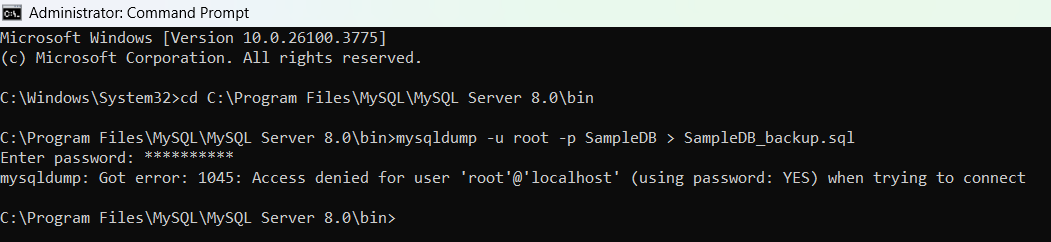
Output: