Sign in with Google
Get Product Stock History Using InventoryLogs
Get Product Stock History Using InventoryLogs
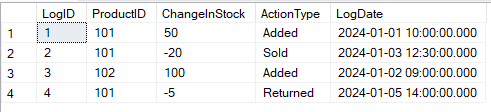
InvertLogs Table:
Query Explanation:
-
SELECT: Retrieves stock change records from the table. -
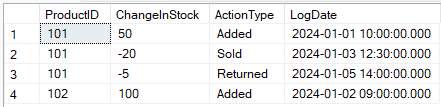
ChangeInStock: Shows how stock changed (positive = added, negative = removed). -
ActionType: Indicates the reason for the stock change (Added,Sold,Returned, etc.). -
LogDate: Timestamp when the stock change occurred. -
ORDER BY ProductID, LogDate: Displays logs in chronological order per product.
SQL Query:
SELECT
    ProductID,
    ChangeInStock,
    ActionType,
    LogDate
FROM
    InventoryLogs
ORDER BY
    ProductID,
    LogDate;
Output: