Sign in with Google
Create a View for Products in Stock with Supplier Name
Create a View for Products in Stock with Supplier Name
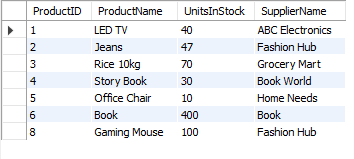
Products Table:

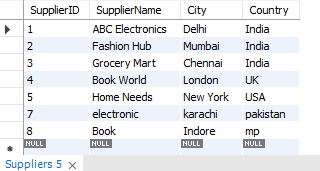
Suppliers Table:
Query Explanation:
-
CREATE VIEW ProductsInStock AS: A new view is being created called
ProductsInStock. -
SELECT p.ProductID, p.ProductName, p.UnitsInStock, s.SupplierName: Selects the
ProductID,ProductName,UnitsInStockfrom theProductstable and theSupplierNamefrom theSupplierstable. -
FROM Products p JOIN Suppliers s: Joins the
Productstable with theSupplierstable. -
ON p.SupplierID = s.SupplierID: The join condition is based on matching the
SupplierIDbetween the two tables. -
WHERE p.UnitsInStock > 0: Filters to include only products that are in stock (where
UnitsInStockis greater than 0).
This view will return a list of products that are in stock, along with their supplier names.
SQL Query:
-- Step 1: Create a view for products in stock with the supplier name
CREATE VIEW productsinstock AS
SELECT
    products.ProductID,                                -- Product ID from Products table
    products.ProductName,                              -- Product Name from Products table
    products.UnitsInStock,                             -- Units in stock from Products table
    Suppliers.SupplierName                             -- Supplier Name from Suppliers table
FROM
    products                                           -- From the Products table
JOIN
    suppliers                                          -- Join with Suppliers table to get the supplier name
    ON suppliers.SupplierID = products.SupplierID      -- Matching SupplierID in both tables
WHERE
    UnitsInStock > 0;                                  -- Only include products that are in stock (UnitsInStock > 0)

-- Step 2: View the data from the productsinstock view
SELECT * FROM productsinstock;
Output: