
 Sign in with Google
Create a Procedure to Get Supplier Details by City
Create a Procedure to Get Supplier Details by City
Suppliers Table:
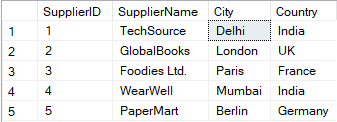
QUERY Explanation:
-
GObeforeCREATE PROCEDURE
SQL Server requiresCREATE PROCEDUREto be the first statement in a batch. So we useGOto start a new batch. -
CREATE PROCEDURE dbo.GetSupplierDetailsByCity
This defines a stored procedure that takes one parameter@City, which is used to filter the suppliers by their city. -
Query Inside the Procedure
It fetchesSupplierID,SupplierName,ContactName,City, andCountryfrom theSupplierstable where theCitymatches the value passed through@City. -
EXECStatement
This line actually runs the stored procedure with'Delhi'as the city. You can change'Delhi'to any city you want to fetch suppliers from.
SQL Query:
-- Step 1: Separate the batch so that CREATE PROCEDURE is the first statement
GO

-- Step 2: Creating a procedure to get supplier details by city
CREATE PROCEDURE dbo.GetSupplierDetailsByCity
    @City VARCHAR(100)  -- Input parameter: name of the city to filter suppliers
AS
BEGIN
    -- Fetch supplier details where the city matches the input parameter
    SELECT SupplierID, SupplierName, ContactName, City, Country
    FROM Suppliers
    WHERE City = @City;  -- Important: Use @City to refer to the input parameter
END;

GO

-- Step 3: Executing the stored procedure to get suppliers from 'Delhi'
EXEC dbo.GetSupplierDetailsByCity @City = 'Delhi';
Output:

