Sign in with Google
Place an Order and Update Stock in SQL
Place an Order and Update Stock in SQL
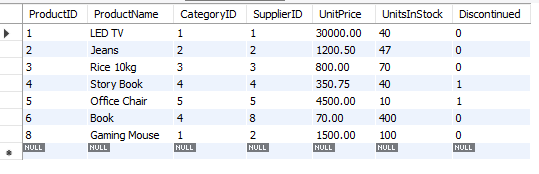
products Table:
Query Explanation:
-
START TRANSACTION;
Begins a new transaction block. All subsequent operations will be treated as a single unit of work. -
INSERT INTO orders(...) VALUES (...);
Adds a new record to theorderstable with:-
OrderID = 120(must be unique), -
CustomerID = 5, -
EmployeeID = 5, -
OrderDate = '2025-04-13', -
ShipperId = 4.
-
-
INSERT INTO orderdetails(...) VALUES (...);
Adds a new entry to theorderdetailstable for the new order:-
OrderDetailID = 13(must be unique), -
OrderID = 120(links to the newly created order), -
ProductID = 4, -
Quantity = 10, -
UnitPrice = 200.00, -
Discount = 100.
-
-
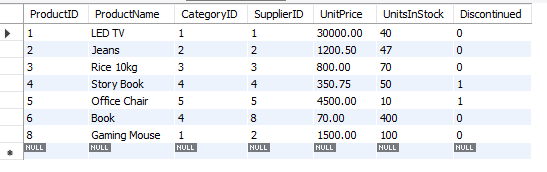
UPDATE products SET UnitsInStock = UnitsInStock - 10 WHERE ProductID = 4;
Reduces the stock of the product withProductID = 4by 10 units. -
COMMIT;
Finalizes the transaction. All operations are permanently applied to the database if no errors occurred. -
SELECT * FROM products;
Displays the current contents of theproductstable after the transaction is completed.
SQL Query:
-- Step 1: Start the transaction
START TRANSACTION;

-- Step 2: Insert new order (make sure OrderID is unique, e.g., 120)
INSERT INTO orders(OrderID, CustomerID, EmployeeID, OrderDate, ShipperId)
VALUES (120, 5, 5, '2025-04-13', 4);

-- Step 3: Insert order details (make sure OrderDetailID is unique, e.g., 13)
INSERT INTO orderdetails(OrderDetailID, OrderID, ProductID, Quantity, UnitPrice, Discount)
VALUES (13, 120, 4, 10, 200.00, 100);

-- Step 4: Update stock for the product
UPDATE products
SET UnitsInStock = UnitsInStock - 10
WHERE ProductID = 4;

-- Step 5: Commit only if everything above was successful
COMMIT;

-- Step 6: View updated products table
SELECT * FROM products;
Output: