
 Sign in with Google
Add Transaction for Order Cancellation
Add Transaction for Order Cancellation
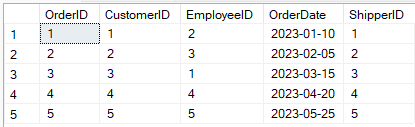
Order Table:
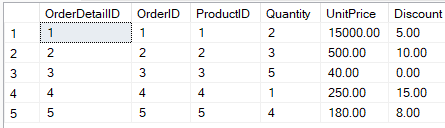
OrderDetails Table:
Query Description:
-
This transaction deletes an order and its related details from the database.
-
If the order exists, both the order and its items are deleted.
-
If the order does not exist, the transaction is rolled back.
-
This ensures data integrity and prevents orphan records.
SQL Query:
USE IT;
BEGIN TRANSACTION;

DECLARE @OrderID INT = 1001;

-- Check if the order exists
IF EXISTS (SELECT 1 FROM Orders WHERE OrderID = @OrderID)
BEGIN
    -- First delete from OrderDetails (child table)
    DELETE FROM OrderDetails WHERE OrderID = @OrderID;

    -- Then delete from Orders (parent table)
    DELETE FROM Orders WHERE OrderID = @OrderID;

    COMMIT TRANSACTION;
    PRINT 'Order and related details cancelled successfully.';
END
ELSE
BEGIN
    ROLLBACK TRANSACTION;
    PRINT 'Cancellation failed: Order not found.';
END;
Output:

