Sign in with Google
Calculate Total Sales per Customer Using SQL Joins
Calculate Total Sales per Customer Using SQL Joins
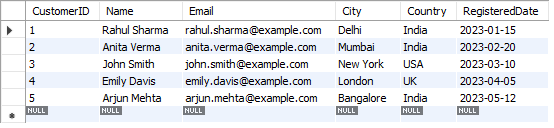
customers Table:
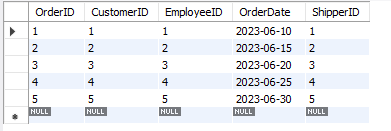
orders Table:
OrderDetails Table:

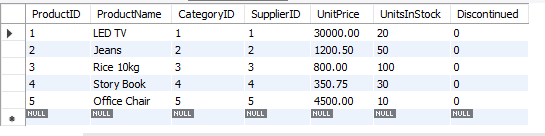
producs Table:
Query Explanation:
● SELECT Customers.CustomerID, Customers.Name, SUM(OrderDetails.Quantity * Products.Price) AS TotalSales
Displays the customer's ID, name, and total sales amount (calculated as quantity × price) for each customer.
● FROM Customers
Starts from the Customers table.
● JOIN Orders ON Customers.CustomerID = Orders.CustomerID
Connects each customer with their orders.
● JOIN OrderDetails ON Orders.OrderID = OrderDetails.OrderID
Links each order with its order details (products and quantity).
● JOIN Products ON OrderDetails.ProductID = Products.ProductID
Retrieves the price of each product from the Products table.
● GROUP BY Customers.CustomerID, Customers.Name
Groups the results by each customer to calculate their total sales.
SQL Query:
USE SalesInventoryDB;

SELECT
    Customers.CustomerID,
    Customers.Name,
    SUM(OrderDetails.Quantity * Products.unitPrice) AS TotalSales
FROM
    Customers
JOIN
    Orders ON Customers.CustomerID = Orders.CustomerID
JOIN
    OrderDetails ON Orders.OrderID = OrderDetails.OrderID
JOIN
    Products ON OrderDetails.ProductID = Products.ProductID
GROUP BY
    Customers.CustomerID, Customers.Name;
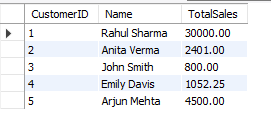
Output: