Sign in with Google
Write a Procedure That Updates Stock After Order
Write a Procedure That Updates Stock After Order
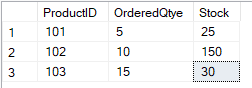
Products Table:
Query Explanation:
-
Products table holds product details and stock.
-
Procedure checks if sufficient stock is available.
-
If yes → subtracts the ordered quantity.
-
If not → prints an error.
-
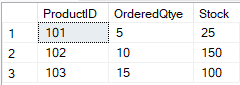
Example shows usage and final result.
SQL Query:
-- Step 1: Create the Products table to store product stock info
CREATE TABLE Products (
    ProductID INT PRIMARY KEY,
    ProductName VARCHAR(100),
    Stock INT
);
GO

-- Step 2: Insert some sample product data
INSERT INTO Products (ProductID, ProductName, Stock)
VALUES
(101, 'Laptop', 50),
(102, 'Mouse', 150),
(103, 'Keyboard', 100);
GO

-- Step 3: Create the procedure to update stock after an order is placed
CREATE PROCEDURE dbo.UpdateStockAfterOrder
    @ProductID INT,
    @OrderedQty INT
AS
BEGIN
    -- Check if the product exists and enough stock is available
    IF EXISTS (
        SELECT 1 FROM Products
        WHERE ProductID = @ProductID AND Stock >= @OrderedQty
    )
    BEGIN
        -- Update the stock: subtract the ordered quantity
        UPDATE Products
        SET Stock = Stock - @OrderedQty
        WHERE ProductID = @ProductID;

        PRINT 'Stock updated successfully.';
    END
    ELSE
    BEGIN
        -- Handle the case when stock is not sufficient
        PRINT 'Not enough stock available for this product.';
    END
END;
GO

-- Step 4: Execute the procedure to update stock
EXEC dbo.UpdateStockAfterOrder @ProductID = 101, @OrderedQty = 5;

-- Step 5: Check the updated stock
SELECT * FROM Products;
Output: