
 Sign in with Google
Procedure to Delete All Discontinued Products
Procedure to Delete All Discontinued Products
Products Table:
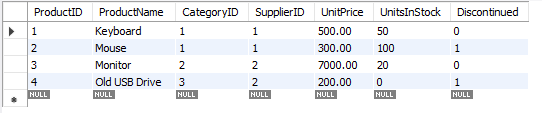
Query Explanation:
-
DELIMITER //
This changes the delimiter temporarily so that we can define the procedure properly (since semicolons are used within the procedure). -
CREATE PROCEDURE DeleteDiscontinuedProducts1()
This starts the creation of the procedure. The procedure name isDeleteDiscontinuedProducts1, and it takes no parameters. -
DELETE FROM Product1 WHERE Discontinued = 1;
This is the main query that will delete all records from theProduct1table where theDiscontinuedfield is set to 1. -
END //
This marks the end of the procedure. -
DELIMITER ;
This restores the default delimiter back to a semicolon (;). -
CALL DeleteDiscontinuedProducts1();
This statement executes the stored procedure and deletes all discontinued products from theProduct1table.
SQL Query:
DELIMITER //

CREATE PROCEDURE DeleteDiscontinuedProducts1()
BEGIN
    -- Delete all products where the 'Discontinued' flag is set to 1
    DELETE FROM Product1
    WHERE Discontinued = 1;
END //

DELIMITER ;


-- To execute the procedure, you can run the following command:
CALL DeleteDiscontinuedProducts1();
Output:

