Sign in with Google
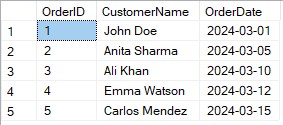
List Orders with Customer Names and Order Date
List Orders with Customer Names and Order Date
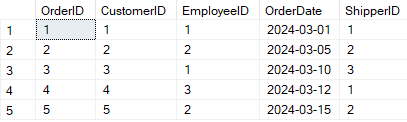
Order Table:
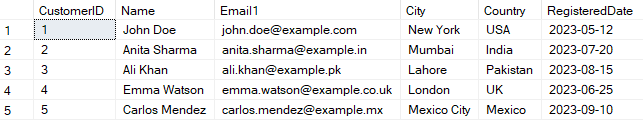
Customer Table:
Query Explanation:
-
SELECT Customers.CustomerName, Orders.OrderDate:
This selects the customer's name and the order date to be shown in the result. -
FROM Orders:
You're starting from theOrderstable (which has info about the orders). -
JOIN Customers:
You're joining theCustomerstable to get the names of the customers. -
ON Orders.CustomerID = Customers.CustomerID:
This connects the two tables using the common columnCustomerID
SQL Query:SELECT Customers.CustomerName, Orders.OrderDate FROM Orders JOIN Customers ON Orders.CustomerID = Customers.CustomerID;
Output: