Sign in with Google
Retrieve Orders Where Total Amount Is Greater Than 500
Retrieve Orders Where Total Amount Is Greater Than 500
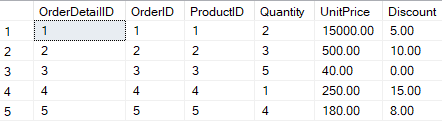
OrderDetails Table:
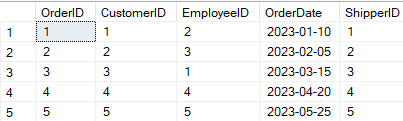
Orders Table:
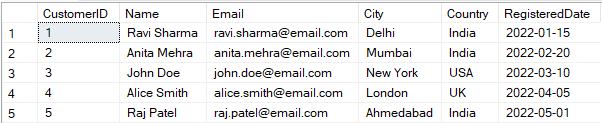
Customers Table:
Query Explanation:
-
"Retrieve orders" → we select from the
Orderstable (o) and join withOrderDetails(od). -
"Where total amount > 500" → we calculate the total using
Quantity * UnitPrice * (1 - Discount/100)and apply the filter in theHAVINGclause. -
JOIN ensures we get the products and pricing details for each order.
-
GROUP BY is used to calculate the total amount per order.
SQL Query:
SELECT
    o.OrderID,
    o.CustomerID,
    o.OrderDate,
    SUM(od.Quantity * od.UnitPrice * (1 - od.Discount / 100)) AS TotalAmount
FROM
    Orders o
JOIN
    OrderDetails od ON o.OrderID = od.OrderID
GROUP BY
    o.OrderID, o.CustomerID, o.OrderDate
HAVING
    SUM(od.Quantity * od.UnitPrice * (1 - od.Discount / 100)) > 500;
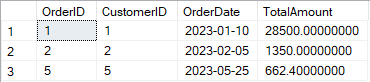
Output: