Sign in with Google
Create a Computed Column for FullName in Employees
Create a Computed Column for FullName in Employees
Query Explanation:
● EmployeeID INT PRIMARY KEY
Creates a column EmployeeID which uniquely identifies each employee. No duplicates are allowed.
● FirstName VARCHAR(50)
Stores the first name of the employee, allowing up to 50 characters.
● LastName VARCHAR(50)
Stores the last name of the employee, allowing up to 50 characters.
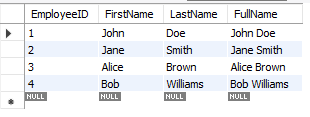
● FullName VARCHAR(101) GENERATED ALWAYS AS (CONCAT(FirstName, ' ', LastName)) STORED
This defines a computed column:
-
CONCAT(FirstName, ' ', LastName)joins the FirstName, a space' ', and LastName into a single string. -
GENERATED ALWAYS AS (...)tells MySQL to automatically calculate this column whenever a row is inserted or updated. -
STOREDmeans the computed value is physically saved in the database like a normal column (not calculated every time it's queried).
Summary:
● This method helps to avoid repeating the same logic when you want full names.
● It keeps data clean, consistent, and automatic.
● You don’t need to manually calculate or update FullName.
SQL Query:
-- Creating Employees4 table with a generated FullName column (MySQL syntax)
CREATE TABLE Employees4 (
    EmployeeID INT PRIMARY KEY,                         -- Unique ID
    FirstName VARCHAR(50),                              -- First name
    LastName VARCHAR(50),                               -- Last name
    FullName VARCHAR(101) GENERATED ALWAYS AS (CONCAT(FirstName, ' ', LastName)) STORED  -- Computed column
);

-- Inserting sample data
INSERT INTO Employees4 (EmployeeID, FirstName, LastName)
VALUES
(1, 'John', 'Doe'),
(2, 'Jane', 'Smith'),
(3, 'Alice', 'Brown'),
(4, 'Bob', 'Williams');
Output: