Sign in with Google
Alter Products Table to Add Default Value for UnitsInStock
Alter Products Table to Add Default Value for UnitsInStock
Query Explanation:
-
CREATE TABLE Products3:
Creates a new table namedProducts3with six columns:
ProductID,ProductName,CategoryID,SupplierID,UnitPrice, andUnitsInStock. -
ProductID INT PRIMARY KEY:
ProductIDis the primary key, meaning each product must have a unique ID. -
ALTER TABLE... SET DEFAULT 10:
Sets the default value of theUnitsInStockcolumn to10.
If you don’t provide a value for this column during insertion, it will automatically be set to10. -
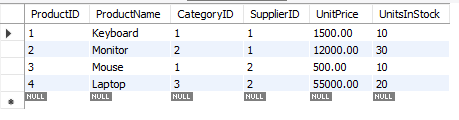
INSERT INTO Products3...:
Four rows are inserted:-
Row 1 (Keyboard): No
UnitsInStockprovided → uses default = 10 -
Row 2 (Monitor):
UnitsInStock= 30 (manually specified) -
Row 3 (Mouse): No
UnitsInStockprovided → uses default = 10 -
Row 4 (Laptop):
UnitsInStock= 20 (manually specified)
-
SQL Query:
-- Creating Products3 table
CREATE TABLE Products3 (
    ProductID INT PRIMARY KEY,
    ProductName VARCHAR(100),
    CategoryID INT,
    SupplierID INT,
    UnitPrice DECIMAL(10,2),
    UnitsInStock INT
);

-- Alter table to add DEFAULT value for UnitsInStock
ALTER TABLE Products3
ALTER COLUMN UnitsInStock SET DEFAULT 10;

-- Inserting 4 rows of data into Products3

-- 1. Insert with default UnitsInStock (will be 10)
INSERT INTO Products3 (ProductID, ProductName, CategoryID, SupplierID, UnitPrice)
VALUES (1, 'Keyboard', 1, 1, 1500.00);

-- 2. Insert with specified UnitsInStock
INSERT INTO Products3 (ProductID, ProductName, CategoryID, SupplierID, UnitPrice, UnitsInStock)
VALUES (2, 'Monitor', 2, 1, 12000.00, 30);

-- 3. Insert with default UnitsInStock (will be 10)
INSERT INTO Products3 (ProductID, ProductName, CategoryID, SupplierID, UnitPrice)
VALUES (3, 'Mouse', 1, 2, 500.00);

-- 4. Insert with specified UnitsInStock
INSERT INTO Products3 (ProductID, ProductName, CategoryID, SupplierID, UnitPrice, UnitsInStock)
VALUES (4, 'Laptop', 3, 2, 55000.00, 20);
Output: