Sign in with Google
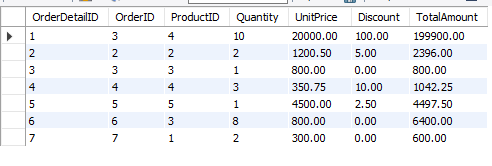
View of Order Details with Total Amount Per Row
View of Order Details with Total Amount Per Row
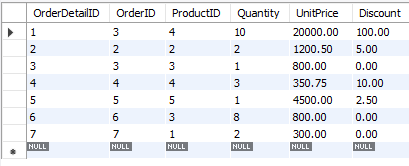
Orderdetails Table:
Query Explanation:
-
CREATE VIEW orderdetailswithtotalamount: This creates a new view named
orderdetailswithtotalamountthat will hold the order details along with the total amount calculated for each order line. -
SELECT: Retrieves columns from the
OrderDetailstable and calculates the total amount for each row. -
((orderdetails.UnitPrice * orderdetails.Quantity) - orderdetails.Discount) AS TotalAmount: This expression calculates the total cost for each product by multiplying the unit price by the quantity and subtracting any discount applied.
SQL Query:
-- Step 1: Create a view for order details with total amount per row
CREATE VIEW orderdetailswithtotalamount AS
SELECT
    orderdetails.OrderDetailID,                        -- Order Detail ID
    orderdetails.OrderID,                              -- Order ID from OrderDetails table
    orderdetails.ProductID,                            -- Product ID from OrderDetails table
    orderdetails.Quantity,                             -- Quantity of products in the order
    orderdetails.UnitPrice,                            -- Unit price of each product
    orderdetails.Discount,                             -- Discount on the order
    ((orderdetails.UnitPrice * orderdetails.Quantity) - orderdetails.Discount) AS TotalAmount  -- Calculating Total Amount (UnitPrice * Quantity - Discount)
FROM
    orderdetails;                                     -- From the OrderDetails table

-- Step 2: View the data from the orderdetailswithtotalamount view
SELECT * FROM orderdetailswithtotalamount;
Output: